
Keyword research for a small blog: the complete guide
Keyword research for a small blog: find the phrases buyers search, judge volume and difficulty with care, and plan one post per goal.

Keyword research is the work of finding the words your readers type into a search box, then deciding which of those searches deserve a post on your blog. For a small blog it is less about big numbers and more about fit: the phrases your buyers use, the goal behind each one, and whether you can write the best page for it.
This guide is part of our complete guide to SEO writing, and it covers the step before the writing starts. You will learn where to find good phrases, how to judge them, how to group them into posts and how to choose what to write first. A worked example near the end follows one small company from a blank sheet to a plan for its first quarter.
What is keyword research? #
Keyword research is the process of finding the phrases people search for, learning the goal behind each phrase, and choosing which ones your site should answer. It turns guesses about what readers want into a plan: a list of posts, each built around one search goal, ranked by what it is worth to your business.
Why a small blog needs its own approach #
Most advice on keyword research is written for sites with years of links and a team of writers. Those sites can chase broad, busy phrases and wait for them to pay. A small blog cannot, at least not yet. If you publish a post a fortnight, every slot counts, and a post aimed at a phrase you cannot win is a slot thrown away.
That changes what good research looks like. You are not hunting for the biggest numbers. You are hunting for phrases where three things meet: real people search for them, your business can help those people, and the pages ranking today leave room for a better answer.
In keyword research, small sites have one real advantage over large ones. You know your customers. You hear their words on calls and read them in emails. Large sites guess at those words with tools. You can simply write them down.
Start with what your customers already ask #
Tools are good at growing a list. They are poor at starting one, because they only know what you type into them. So start your keyword research away from the tools, with the people who pay you.
Collect seed phrases from the places below. A seed phrase is a starting point: a few words that describe a problem, which you will expand and test later.
- Sales calls. Ask the sales team for the questions buyers ask before they sign. Write them down in the buyer's words, not yours.
- The support inbox. A question that comes back every week is a search that happens every day. Each one is a post that saves your team time as well as winning visits.
- Proposals and lost deals. The doubts you meet in proposals are the comparisons buyers search for.
- Your own site search. If your site has a search box, its log shows what visitors expected to find and did not.
- Search Console. The Performance report lists the searches that already show your pages. Look for the ones where you appear but rank low. Readers are telling you what they want from you.
- Forums and communities. Trade forums and question sites show how people describe a problem before they know the trade words for it.
Aim for a long, messy list at this stage of your keyword research. Fifty rough phrases is a good start for a small business. Do not judge them yet. Judging comes after you have seen what search engines show for each one.
If your site is not yet connected to Google's free reporting tool, our Search Console set-up walkthrough gets you the query data in an afternoon. Google's own overview of what Search Console does lists the reports it gives you.
Read the results page for each phrase #
The results page is the most honest tool for keyword research you will ever use, and it costs nothing. Search engines have already worked out what people want when they type a phrase. They show you the answer in the pages they choose.
Search each phrase in a private window. Spend two or three minutes on it and note five things:
- The kind of page. Guides, lists, product pages, tools, videos or forum threads.
- The goal. Do searchers want to learn, compare, buy or reach one site? This goal is called search intent, and our full explainer on it shows how to read the goal in ten minutes.
- The extra boxes. A Featured snippet at the top means a short, direct answer wins. An AI Overview means the search engine answers before the links, so your page needs something a summary cannot give, such as a template, a worked case or real experience.
- Who ranks. Small sites and forum threads near the top mean the phrase is open. A page full of famous brands and public bodies means it is not, at least not for a new post.
- How fresh the pages are. Old dates on the pages that rank are a gap you can fill.
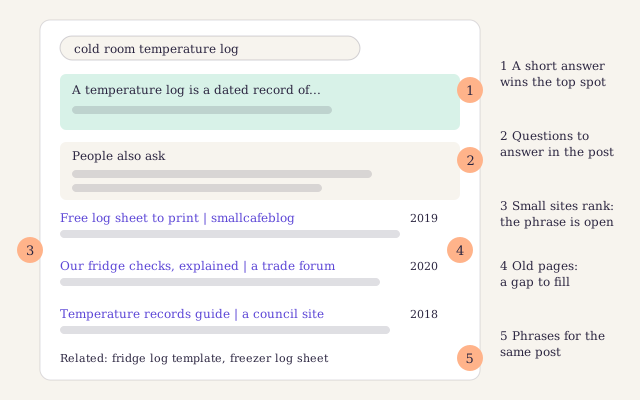
A made-up results page for "cold room temperature log". Label one says a short answer wins, label three says small sites already rank, and label four says the pages are old. That is an open door.
Long-tail phrases are where small blogs win #
A long-tail keyword is a longer, more specific phrase that fewer people search for. "Temperature sensor" is short and broad. "Wireless temperature sensor for a walk-in fridge" is a long-tail phrase.
Long-tail keywords suit a small blog for three reasons:
- They say what the searcher wants. A broad phrase can mean ten things. A long one tends to mean one, so you can write the exact page.
- Fewer strong sites target them. Big sites aim at the busy phrases and leave the specific ones open.
- They bring people closer to acting. Someone who types a detailed problem is nearer to a decision than someone who types two words.
The long tail also adds up. One post that answers a specific question well tends to show for dozens of related phrases, many too small for any tool to list. Search Console reveals them a few months after you publish, and they are often the best ideas for your next post. That is why keyword research for a small blog leans on the long tail.
Treat search volume as an estimate #
Search volume is the number of times a phrase is searched in a month, on average, in one country. Every keyword tool shows it, and every tool's number is an estimate. Tools build their figures from different data, such as ad data, panels of users who share their browsing and their own models. Two tools can disagree by a wide margin on the same phrase, and neither is lying.
So use the numbers for what they are good at in keyword research: comparing phrases with each other.
- Compare inside one tool. If one tool says phrase A is four times the size of phrase B, that ratio is useful. Mixing a number from one tool with a number from another is not.
- Expect ranges. Google's free Keyword Planner shows many accounts a range rather than a single figure.[^1]
- Check the season. Volume is a monthly average. A phrase about summer fridge alarms may spike in July and vanish in winter. Google Trends shows the shape of interest over the year.
- Do not read a small number as zero. Tools miss many specific phrases. If customers ask the question, people search for it.
- Remember that volume is not visits. When an answer box settles the question on the results page, many searchers never click.
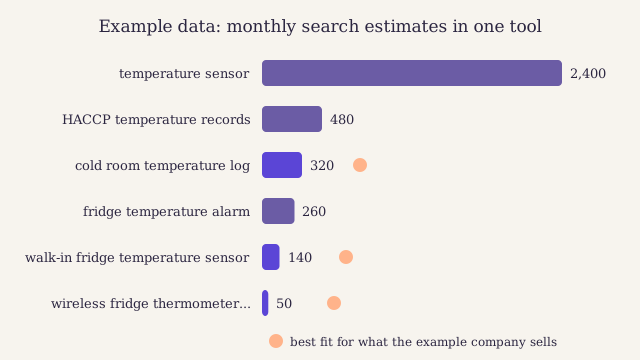
Example data from one tool. The broad phrase has the tallest bar and the worst fit: it mixes shoppers, students and engineers. The three marked phrases are smaller, but each one is a question the example company's buyers ask.
Read keyword difficulty with care #
Keyword difficulty is a score that estimates how hard it is to reach the first page for a phrase. Most tools base it largely on links: how many other sites link to the pages that rank today. Each tool uses its own formula, so a middling score in one tool can be a high one in another. Keyword difficulty is a sorting aid, not a verdict.
What the score sees
Links to the pages that rank now, and often the strength of those whole sites. A phrase where every top page has links from hundreds of sites will be slow for a new post to win.
What the score misses
Whether the top pages answer the question well. A strong site with a thin, dated page is beatable. The score cannot see that, but you can, in two minutes on the results page.
How tools work out a difficulty score
Most tools look at the pages ranking on the first page and count the sites that link to each one. Some add the strength of the whole domain, and some weigh the content as well. The exact method belongs to each vendor and is described in their own help pages. That is why the score is for sorting phrases inside one tool, never for comparing tools.
A quick check without any tool works well for keyword research on a small blog. A phrase is open if the first page shows forum threads, small blogs, thin pages, old pages or pages that miss the searcher's goal. If you see none of these, and every result is a strong, current page from a well-known site, move on. Each Backlink those pages earned took years.
Group phrases by goal: one post per search #
Your list will hold many phrases that mean the same thing. "Fridge temperature log", "cold room temperature record sheet" and "temperature log template" may all want the same page. Write three posts and they compete with each other. Write one and it can rank for all three. Grouping is the step most keyword research skips, and it is the one that saves the most work.
The test is the results page again. Search two phrases and compare the top results. If several of the same pages rank for both, the phrases share a goal and belong in one post. If the pages are different, the goals differ, and each phrase needs its own page.
Keep the groups in a plain sheet. A simple format, one row per phrase, is enough:
phrase,goal,group,value,post
cold room temperature log,know,temperature logs,high,/khalid/templates/workbench/temperature-log-template/
fridge temperature record sheet,know,temperature logs,high,/khalid/templates/workbench/temperature-log-template/
walk-in fridge alarm at night,know,alarms,high,/khalid/templates/workbench/fridge-alarm-guide/
wireless fridge sensor,compare,sensors,high,/khalid/templates/workbench/wireless-sensors-compared/
A keyword map for a small blog #
A keyword map is the summary of that sheet: one row per post, with the main phrase, the other phrases it should answer, the goal and the value. It stops two writers from planning the same post, and it shows the gaps at a glance.
| Main phrase | Other phrases in the group | Goal | Value | Planned post |
|---|---|---|---|---|
| cold room temperature log | fridge temperature record sheet, temperature log template | Know: wants a sheet | High | A free log template with a guide |
| walk-in fridge temperature alarm | fridge alarm at night, cold room alarm settings | Know, then buy | High | Why fridge alarms go off and what to do |
| wireless fridge sensor | remote fridge monitoring, wifi fridge thermometer | Compare | High | Wireless sensors compared for small kitchens |
| how long to keep fridge records | temperature record rules | Know | Some | A short answer post |
| what temperature should a fridge be | fridge temperature range | Know | Low | Skip: the answer box settles it |
Each row becomes a brief for the writer. Our content brief template has a field for each column above, so the research travels with the post.
Score each phrase by business value #
Volume tells you how many people search. Business value tells you whether those people matter to you. For a small business, the second question decides more of your keyword research than the first.
Give each group a simple value grade:
- High. Your product or service is a natural answer. A reader could become a customer on this page.
- Some. Your product helps, but it is not the main answer. The post builds trust and earns links.
- Low. The subject is close to your field, but readers will not need you.
- None. Traffic for its own sake. Leave it to others.
Then set the value against your chance of ranking, which you judged on the results page. The grid below turns those two grades into a decision.
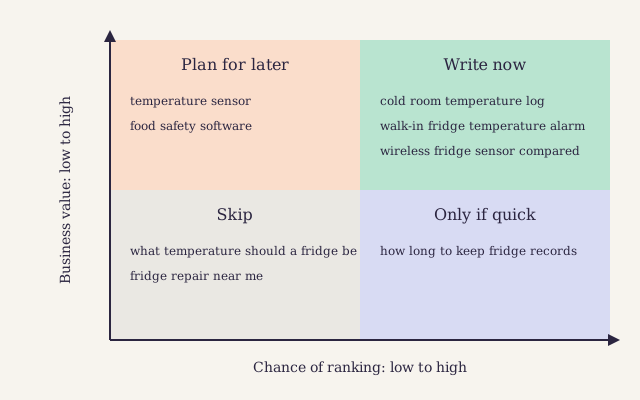
Start in the top right square: high value, real chance. The top left holds phrases worth winning later, once the blog has more links and more posts on the subject.
The phrase with the biggest number is rarely the one that pays. Pick the search your best customer made the week before they called you.
When you know what each post is worth, you can also measure whether it paid back. Our guide to return on content shows how to count the cost and the results, post by post.
Keyword research tools compared #
You can do good keyword research with free tools. Paid tools make it faster on large lists. The table shows what each kind of tool gives a small team.
| Tool | What it gives you | Cost | Best for |
|---|---|---|---|
| Google Search Console | Searches your pages already show for, with clicks and position | Free | Phrases you nearly rank for |
| Google Keyword Planner | Volume ranges and related phrases from ad data | Free with a Google Ads account | The rough size of a phrase |
| Google Trends | Interest over time and by region, as a relative scale | Free | Seasons and rising subjects |
| Paid SEO suites | Volume, difficulty, ranking pages and their links | Paid | Speed and depth on long lists |
| Your inbox and call notes | The customer's own words | Free | Seed phrases nobody else has |
Should a small blog pay for a suite? Weigh it up:
Pros
- Volume, difficulty and the ranking pages in one view, which saves hours on a long list
- Lists of related questions you would not think of yourself
- A view of the phrases rival sites rank for
Cons
- Another monthly bill for a team that may publish twice a month
- Numbers that look exact but are estimates, which tempts people to chase them
- No knowledge of your customers' words, which is the part that matters most
Our guide to choosing SEO tools without overspending compares the paid suites, and our list of the best free SEO tools covers everything you need before you pay for one.
Numbers from 140 small business blogs, free to read.
A worked example: Coldline plans its first quarter #
One small company, one afternoon of research, six posts in order.
Coldline is a made-up company of five people. It sells wireless temperature sensors to restaurants, cafés and small food shops. Its blog holds a handful of news posts and no plan. The founder can write one post a fortnight, so the first quarter has room for six.
The seed list #
The founder spent a morning with the sales lead and the support inbox. Together they wrote down forty phrases in the customers' own words. A few of them:
- "fridge alarm going off at night"
- "how do I prove fridge temperatures to an inspector"
- "cold room temperature log"
- "wifi thermometer for a walk-in fridge"
- "what happens if the freezer fails over a weekend"
None of these came from a tool. Every one came from a real conversation.
What the results pages showed #
The next step of their keyword research was the results page. They searched each phrase, and three things stood out. For "cold room temperature log", the top pages were old printable sheets on small sites: a clear gap. For "temperature sensor", the page was full of electronics shops and engineering sites: the wrong goal for Coldline. For "fridge alarm going off at night", forum threads ranked: people were asking and nobody had written the answer.
They ran the forty phrases through one keyword tool for volume and difficulty. They used the numbers only to rank the phrases against each other, never as forecasts.
The groups and the map #
Comparing results pages cut forty phrases to eleven groups. Each group became one row in the keyword map, like the table earlier in this guide. Two groups were dropped at once: "temperature sensor" had the wrong goal, and "what temperature should a fridge be" was settled by the answer box.
The plan for the first quarter #
Coldline ordered the nine remaining groups by value first and chance second, then took the top six:
- A free cold room temperature log, with a guide to filling it in.
- Why fridge alarms go off at night, and what to check first.
- How to show an inspector your temperature records.
- Wireless fridge sensors compared for small kitchens.
- What to do when a freezer fails over a weekend.
- How long to keep temperature records.
The first two answer questions the support team hears every week. The fourth is the post closest to a sale, so it links to the product page. Each post links to the others where a reader would need them, and the founder placed them in a shared content calendar with a date and an owner.
Run your keyword research in one afternoon #
-
Collect seed phrases
Spend an hour with sales notes, the support inbox and Search Console. Write down every question in the customer's words. Do not judge yet.
-
Expand the list with one tool
Put the seeds into one keyword tool and add the related phrases that fit your business. Stay inside that one tool for every number you note.
-
Check what ranks for each phrase
Search each phrase in a private window. Note the kind of page, the goal, the extra boxes, who ranks and how old the pages are.
-
Group phrases that share a results page
When the same pages rank for two phrases, put them in one group. Each group becomes one post.
-
Grade value and chance
Give each group a business value grade and a chance of ranking. Use the grid to sort them into write now, later, only if quick and skip.
-
Build the keyword map
One row per post: the main phrase, the other phrases, the goal, the value and the planned title. Share it with everyone who writes.
-
Put the first posts in the calendar
Take the top of the list, give each post a date and an owner, and turn each row into a brief.
Mistakes that waste a small team's time #
- Chasing the biggest number. Broad phrases bring mixed visitors and strong rivals. Specific ones bring buyers.
- Mixing numbers from different tools. Each tool estimates in its own way. A comparison across tools tells you nothing.
- One post per phrase. Near-identical posts compete with each other. One post per goal ranks better than three thin ones.
- Skipping the results page. The numbers cannot tell you the goal. Only the results page can.
- Writing for searches your buyers never make. Traffic from people who will never need you is a cost, not a win.
- Doing keyword research once. Phrases and goals shift. Read the results page again whenever a post starts to slip, and use our refresh playbook to decide what to update.
AI search tools add a twist. They often split one question into several smaller searches, a process called Query fan-out, and then pull answers from many pages. That rewards a page that covers one goal in full, with a plain answer for each sub-question. Grouping phrases by goal, as this guide shows, is exactly the right preparation. Our guide to being found in AI search explains the rest.
Questions about keyword research #
How many keywords should one blog post target?
One main goal, with as many phrases as share it. A good post on a fridge temperature log can rank for a dozen ways of asking for one. If two phrases bring up different results pages, they want different posts, so split them and do not force both into one page.
Do I need a paid tool for keyword research?
No. A small blog can do solid research with Search Console, Google Trends, the results page and its own customer questions. A paid suite saves time on long lists and shows rival sites' phrases. Buy one when the time it saves is worth more to you than its monthly cost.
How often should I repeat keyword research?
Do a full round when you plan a new quarter, and a quick check whenever an important post starts to lose clicks. Search Console shows new phrases your pages appear for every month. Those are often the best leads, because they show what readers already expect from you.
What is a good search volume for a small blog?
Any volume where the searchers could become customers. A phrase with a small estimate that buyers type before they call you is worth more than a busy one full of students. Tools also miss many specific phrases, so a low or missing number does not mean nobody searches for it.
Signing up by email is not open on this site.
By Maren Okafor. Published . Updated .
About the author

Head of content at Larkspur Studio
Experience Twelve years as a newspaper sub-editor and content lead, MA in Journalism
Maren runs the writing desk at Larkspur. Before that she spent eight years cutting other people's copy to fit a newspaper page, which is where she learned that every sentence has to earn its place. She writes about planning posts, structuring them and editing them until a busy reader can act on them.
Reviewed by