
Content strategy for small teams: the complete guide
A content strategy a team of two to five can keep. Set goals, pick topics, plan a steady pace, brief each post, then measure and refresh.

A content strategy is a short, written plan that says what your blog is for, who it serves, which topics it will cover and how you will know it worked. For a small team, it is the difference between a blog that grows each quarter and a blog that runs on whoever has a spare afternoon.
This guide is the hub of our content strategy series. It walks through the whole plan, one decision at a time, and ends with a one-page template and a worked example you can copy. Each section links to a shorter post when a step needs more depth.
What a content strategy is #
A content strategy is a written plan that links your blog to a business goal. It names the readers you serve, the questions you will answer, the formats and pace you will use, who does each job, and the numbers you will check. It fits on one page, and the whole team can read it in five minutes.
That last point matters. A plan that lives in one person's head is not a plan. It is a habit, and it leaves with them. In 2026, only 23% of the 140 blogs in our yearly benchmark of small business blogs used a content calendar the whole team could see. The rest planned in chat threads and memory.
Part one: decide what the blog is for #
Goals, readers and topics. Settle these first and every later choice gets easier.
Tie every goal to the business #
Most blogs start with a vague aim: "build awareness" or "drive traffic". Neither tells you what to write next. A useful content strategy starts from a number the business already tracks, then works back to what the blog can do about it.
Ask the person who owns sales or revenue one question: what would you most like more of? The answer is usually one of four things. Each needs a different kind of post.
| Business goal | What the blog can do | What you measure |
|---|---|---|
| More qualified leads | Answer the questions buyers ask just before they buy | Demo requests or enquiries from blog visits |
| Shorter sales cycles | Publish the answers sales repeats on every call | Posts sent by sales, and fewer repeat questions |
| Fewer support tickets | Turn common tickets into clear how-to posts | Tickets on those topics, month on month |
| Hiring | Show how the team works and what it believes | Applicants who mention the blog |
Pick one main goal and at most one other. A team of three cannot serve four goals well. If you try, each post ends up half for buyers and half for job seekers, and it serves neither.
Know your readers and their questions #
A content strategy is only as good as its list of questions. The best list does not come from a tool. It comes from people who talk to your customers every day.
Spend one hour gathering questions from four places:
- Sales calls. What do buyers ask before they sign? What do they worry about?
- Support tickets. What do customers ask after they sign, again and again?
- Search data. Which searches already bring people to your site? The queries in Google Search Console are free and specific to you.
- Search suggestions. Type your main topics into a search bar and note the questions people ask next.
Then group the questions by the reader's goal. Some want to learn, some want to compare, and some want to act now. Reading the intent behind each search tells you which kind of page to write. Our guide to finding what people search for shows how to check demand for each question, including how many people search for it and the longer, more specific phrasings small blogs can win.
Choose topics and build topic clusters #
A topic cluster is a group of posts on one subject. One long guide, called a pillar page, covers the subject from end to end. Shorter posts each go deep on one part, and every post links back to the guide. This page is the pillar of our own cluster on planning, and the figure below shows how it fits together.
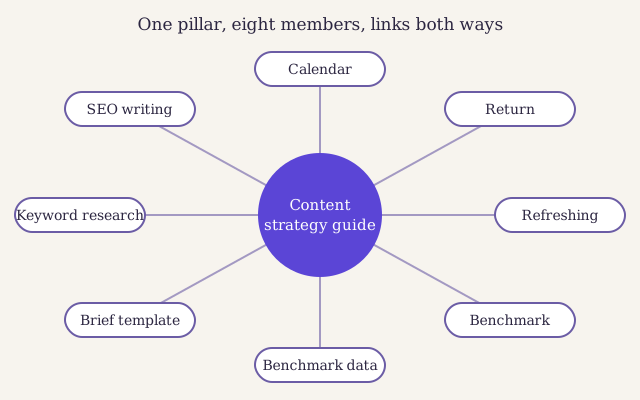
Our own content strategy cluster. The hub covers the whole job. Each spoke goes deep on one step and links back, so a reader is never more than one click from the next step.
Topic clusters help readers first. Someone who lands on a short post can find the whole picture in one click. They also help search engines see that you cover a subject in depth, which builds authority on that subject over time. For a small team, they bring focus. Three clusters done well beat thirty scattered posts.
To choose your first clusters, list the five to eight subjects where your business has real knowledge and your readers have real questions. Then score each candidate topic. We use a simple formula.
Score each part from one to five. Business value asks how close the topic is to your goal. Reader demand asks how often your list of questions, your search data and your sales team bring it up. Effort asks how much research, design and review the post needs. A topic that scores high on value and demand and low on effort goes first.
Here is the formula at work on four example topics for a payroll software firm:
| Example topic | Value | Demand | Effort | Priority |
|---|---|---|---|---|
| How to add a new starter to payroll | Five | Four | Two | Ten |
| Year-end payroll checklist | Four | Five | Three | About seven |
| Payroll software compared | Five | Three | Four | About four |
| A short history of the payslip | One | Two | Two | One |
The scores are not science. They are a way to argue about topics in numbers rather than moods. The history post might be fun to write, and that is exactly why it needs a score.
Pros
- Readers find the next step in one click
- The team plans a whole cluster at once, not one post at a time
- Search engines see depth on a subject, not a scatter of topics
- Old posts gain new links each time a member is added
Cons
- The pillar page takes a week or more to write well
- Clusters need upkeep: every new post must link to the hub and back
- A cluster on a topic nobody searches for is a lot of work for nothing
Pick formats that fit the question #
The question decides the format, not the other way round. A reader who wants a number does not want a guide the length of a short book. A reader who wants to compare tools does not want a story. Match the format to what the reader needs to do next.
| Format | Best for | Typical length | Effort for a small team |
|---|---|---|---|
| Pillar guide | Covering a whole subject and linking the cluster | Long: a few thousand words | High: a week or more |
| How-to post | One task with clear steps | Medium | Medium |
| Comparison | Choosing between two or three options | Medium to long | Medium to high |
| Original data | Numbers no one else has | Any | High, but it earns links and citations |
| Template or checklist | A job the reader does often | Short, plus a download | Low to medium |
| Glossary entry | Defining one term in plain words | A few short paragraphs | Low |
Original data deserves a special word. When ten pages say the same thing, a reader and a search engine have no reason to prefer yours. A count you made yourself is new information the other pages lack. Our benchmark data page shows how we publish ours with its sample and method, so others can check it.
Evergreen posts
Answer questions that will still be asked in three years. They earn visits slowly and keep earning. Most of a small team's plan should be evergreen.
Timely posts
React to news, a rule change or a new tool. They spike and fade. Keep them to one in five posts, and only when you have something to add.
Part two: run the work #
Pace, briefs and roles. This is where most plans fail, so plan for the weeks when things go wrong.
Set a publishing pace you can keep #
The right publishing pace is the fastest one you can keep for a year without cutting corners. For most teams of two to five, that is two to four posts a month, plus time to refresh old ones. Fewer, better posts beat a burst of thin ones followed by silence.
Bursts are costly in a way that is easy to miss. The team rushes three posts out in one week, skips the edit, then goes quiet for two months while client work piles up. Readers who subscribed see nothing. The posts that went out rushed need fixing later.
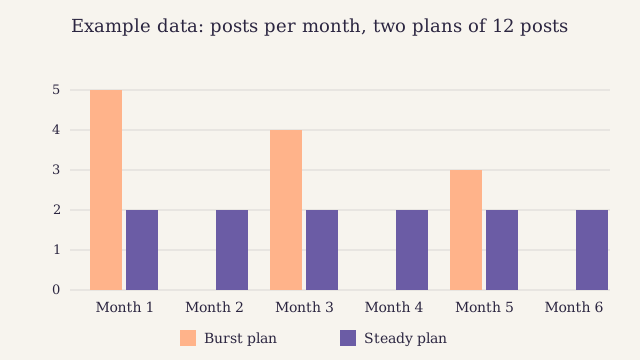
Example data: two plans that both publish twelve posts in six months. The steady plan leaves no month empty, so readers keep coming back and the team always has time to edit.
Set your pace with a simple sum. Count the hours each person can give the blog in a normal month, not a good one. A well-edited post of 1,500 words takes most small teams eight to twelve hours from brief to publish. Divide, then take one post off for safety. Plan it all in a calendar the whole team can see, with an owner and a date on every post.
Brief every post #
A brief is one page that tells the writer what the post must do before they write a word. It names the reader, the question, the goal behind the search, the main points, the sources and the links. It is the cheapest quality check you have.
Without a brief, the editor finds out what the post is about when the draft arrives. Then the rewrites start. With a brief, the editor and writer agree in ten minutes, and the draft lands close to right. Members can copy our free content brief template, which has every field filled in for a real post.
What goes in a good brief?
The reader in one line. The question in their words. The short answer in two or three sentences. The headings a skimmer would need. Three sources to check. The hub page to link to and two other posts to link from. A target date and the name of the editor.
Once the brief is agreed, the writer can follow our guide to writing posts that rank from outline to edit. The brief keeps the post on track. The guide keeps the writing clear.
Roles in a team of two to five #
Small teams do not have a content department. They have people who also do other jobs. That is fine, as long as each job has one named owner. The table shows how we split the work at different sizes.
| Job | Team of two | Team of three | Team of five |
|---|---|---|---|
| Owns the plan and the calendar | Person A | Lead | Lead |
| Writes briefs | Person A | Lead | Editor |
| Writes drafts | Both | Writer | Two writers |
| Edits and checks facts | Person B | Lead | Editor |
| Reviews for expertise | A colleague from the product or service team | Same | Same, on a rota |
| Publishes and links | Person B | Writer | Writer |
| Measures and reports | Person A | Lead | Lead, with help from a writer |
Two rules matter more than the exact split. First, the person who wrote a post never edits it alone. Second, someone who knows the subject reads every post before it goes live. A reviewer's name on the page also shows readers who checked it, which is part of what Google calls experience, expertise, authoritativeness and trust.
A small team does not need more people. It needs every job to have one name next to it, and a calendar that says when.
Measure what the strategy was for #
Measure the goal you set, not whatever the analytics tool shows first. If the goal is demo requests, count demo requests that started on a blog post. Page views are a clue, not a result.
Check three layers once a month:
- Reach. Search impressions and clicks per post, from Search Console. Are people finding the posts?
- Engagement. Time on page and the share of readers who click a next link. Are they reading?
- Results. The goal itself: leads, tickets avoided, applicants. Is the blog doing its job?
Then, once a quarter, put a value on the results and set them against the hours each post cost. Our post on how to measure the return on each post shows how to do it in one spreadsheet. The numbers will be rough. Rough numbers you use beat perfect numbers you never agree on.[^1]
Refresh before you write more #
Posts lose ground as facts change, rivals publish and readers' questions shift. This slow slide is called content decay. It happens to every blog, and a small team that only ever writes new posts is filling a bucket with a hole in it.
Make refreshing part of the publishing pace, not an extra. A good split for a small team is two new posts and one refresh each month. Start with posts that once did well and have slipped. Our playbook for posts that slipped explains what to check, what to change and when to merge or retire a post instead.
The one-page content strategy template #
Copy this into a document, fill in every line, and share it with the whole team. If a line is hard to fill, that is the line your plan needs most.
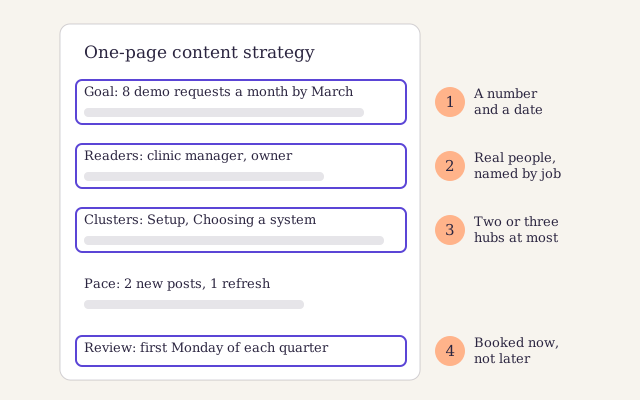
The one-page plan as a team would see it. The four numbered parts carry the most weight: the goal with its number, the readers, the clusters, and the date you will look again.
# One-page content strategy
business_goal: "Eight demo requests a month from the blog by the end of March"
second_goal: "Fewer tickets on the three most common setup questions"
readers:
- "Practice manager at a small clinic, setting up for the first time"
- "Owner comparing tools before a renewal"
question_sources:
clusters:
- name: "Setup"
pillar: "Setting up your clinic's booking system: the guide"
members: "six posts"
- name: "Choosing a system"
pillar: "How to choose booking software for a small clinic"
members: "five posts"
formats: "Mostly how-to posts, one comparison a quarter, one data post a year"
pace: "Two new posts and one refresh a month"
roles:
plan_and_calendar: "Lead"
briefs_and_edits: "Lead"
drafts: "Writer"
expert_review: "Head of support, on a rota"
measures:
monthly:
quarterly:
review_date: "First Monday of each quarter"
Worked example: Fernhill's first year #
Fernhill is a fictional company. It sells booking software to small dental and physio clinics, and its marketing team is three people: a lead, a writer and a designer who gives the blog one day a week. Their old blog had forty posts, most of them company news. Here is how they built a content strategy in one week, with example numbers throughout.
The goal. Sales said the same thing every time: buyers asked how hard it was to move their old bookings across. So the main goal became demo requests, and the second was fewer setup tickets.
The questions. The lead spent an hour with the sales and support inboxes. She found thirty-four distinct questions. Twenty were about setup and moving data. Nine were about choosing a system. Five were one-offs.
The clusters. That split gave them two clusters: "Setup" and "Choosing a system". They scored each question with the priority formula. "How to move your bookings from a spreadsheet" scored highest: high value, steady demand and low effort, because support already had the steps written down.
The pace. The writer had about thirty hours a month for the blog. At ten hours a post, that meant three posts, so they planned two new posts and one refresh.
The archive. They kept six old posts that still drew visits, refreshed two and merged the rest of the company news into one page.
The review. After the first quarter, the lead read the numbers. The setup posts were sent by support twice a day and drew steady search visits. The comparison post had few visits but two demo requests. They kept both clusters and moved one planned post on trade shows to the bottom of the list.
None of this needed a tool beyond a spreadsheet, Search Console and a shared calendar. It needed a page of decisions that everyone could see.
Build your content strategy in a week #
-
Set one goal with a number and a date
Ask sales or the owner what they want more of. Write it as one sentence with a number and a deadline. Add a second goal only if it is close to the first.
-
Gather thirty real questions
Spend an hour in sales notes, support tickets and Search Console. Write each question in the reader's own words.
-
Group the questions into two or three clusters
Put questions on the same subject together. Name each group and decide which long guide will be its hub.
-
Score and order the topics
Score value, demand and effort from one to five for each topic. Sort by priority and keep the top twelve.
-
Set the pace and the owners
Count the hours each person can give in a normal month. Divide by the hours a post takes, take one off, and put a name next to every job.
-
Write it on one page and share it
Fill in the template above, put the first three months into the calendar, and book the first quarterly review now.
Numbers from 140 small business blogs, free to read.
Google's own advice agrees with the core of this plan: write for people first, show who wrote the page and why they know, and add something new.
Questions about content strategy #
How is a content strategy different from a content calendar?
The content strategy decides why you publish, for whom and on what topics. The calendar decides what goes out on which date and who owns it. Write the strategy first, once a year, and review it each quarter. Then fill the calendar from it every month.
How long before a content strategy shows results?
Expect early signs in the first quarter, such as new search impressions and posts that sales start to share. Leads and other business results usually take six months to a year to build. Judge the plan on a full year, and judge single posts on a full quarter.
Do we need an SEO tool to build a content strategy?
No. Your sales notes, your support inbox and Google Search Console are enough to start. A paid tool helps later, when you want to size demand for new topics. Our guide to choosing SEO tools explains what each kind does.
How many topic clusters should a small team run?
Two or three at first. Finish one cluster, with its pillar and at least five members, before you start the next. A finished cluster helps readers and search engines far more than five half-built ones.
What if we can only publish once a month?
Then publish once a month, and make each post count. Pick the highest priority topic, brief it well and refresh one old post each quarter. A steady monthly post builds more than a burst of four followed by silence.
Signing up by email is not open on this site.
By Priya Raman. Published . Updated .
About the author

Research editor at Larkspur Studio
Experience MSc in Statistics, runs the yearly Larkspur content benchmark
Priya turns questions about content into numbers you can trust. She designs the yearly Larkspur content benchmark, checks every statistic we publish against its source, and writes about measuring what content earns and how AI search chooses what to quote.
Reviewed by