
XML sitemaps for blogs: what to include and leave out
Numbers from 140 small business blogs, free to read.

XML sitemaps are files that list the pages you want search engines to find. For a blog, the hard part is not making one. Most blog engines build XML sitemaps for you. The hard part is keeping it honest, so it lists only the pages you want in search and tells the truth about when each one changed.
This post covers what belongs in an XML sitemap, what to leave out, the limits on size, and how to point search engines at the file. It is part of our technical SEO audit guide, which covers the rest of the checks.
What XML sitemaps do for a blog #
Search engines find most pages by following links. XML sitemaps give them a second route in. It helps most with new posts that few pages link to yet, and with large archives where old posts sit many clicks from the home page.
A sitemap is a hint, not an order. Listing a page does not make Google index it, and leaving a page out does not hide it. Our glossary has a short definition of the sitemap format if you want the basics first.
What to include and what to leave out #
The rule for XML sitemaps is simple. Every address in the file should be one you would be glad to see in search results. Google's guide to building and submitting a sitemap asks for the full, absolute address of each page and for the version you prefer to show.
| Put it in | Leave it out |
|---|---|
| Published posts | Drafts and preview links |
| Category pages that hold real content | Thin tag pages you set to noindex |
| Author pages and key pages like About | Search results pages on your own site |
| The main version of each page | Copies that point elsewhere with a canonical tag |
| Pages that load with a normal success code | Addresses that redirect or return an error |
| Each language version of a post | Pages blocked in robots.txt |
Three terms in that table need a word each. A canonical address is the version of a page you want search engines to treat as the real one. A noindex tag asks search engines to keep a page out of their results. And the robots file at the root of your site tells crawlers which paths to skip. If your posts come in more than one language, list each version and tie them together as our guide for a two-language blog shows.
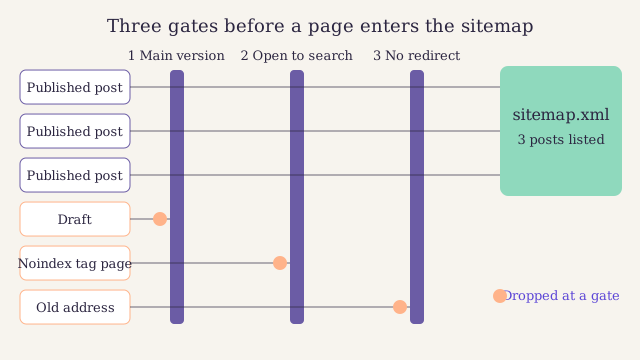
Every page passes three gates before it earns a line in the file: it is the main version, it is open to search, and it loads without a redirect. Notice that each page left out fails a different gate, so one check alone is not enough.
A small sitemap, line by line #
Here is an XML sitemap for a blog with two posts. The first line says the file is written in UTF-8, the text encoding Google asks for. The urlset element wraps the list. Each url entry holds one address in loc and, if you have it, the date it last changed in lastmod, written as year, month and day.
https://www.example.com/blog/core-web-vitals/
2026-10-15
https://www.example.com/blog/search-intent/
2026-06-16
That is the whole thing. No priority, no change frequency, no extra fields.
Why lastmod matters and priority does not #
Many XML sitemaps still carry fields that do nothing. Google's own guide says it ignores the priority and changefreq fields. It does read lastmod, but only when the dates in your XML sitemap prove consistently accurate over time. That means the date should move when the content changes in a way a reader would notice: a new section, a fixed fact, a fresh example.
The common mistake is a blog engine that stamps every page with today's date on each build. After a few weeks of that, the dates mean nothing, and Google learns to skip them. A fixed typo or a new footer link is not a real change either.
Size limits and the sitemap index #
One file can hold up to 50,000 addresses or 50 MB before compression, according to Google's page on managing large sitemaps. Few blogs come close. If yours does, split the list into several files and add a sitemap index: a short file that lists the other sitemap files instead of pages.
Splitting XML sitemaps is also handy when one file would do. Some blogs keep posts, pages and images in separate files, so a report in Search Console shows which group has the problem.
Tell search engines where the file is #
Search engines look for your XML sitemap in two places. The first is your robots.txt file. Add one line with the full address:
Sitemap: https://www.example.com/blog/sitemap.xml
The second is Search Console. Open the Sitemaps report, paste the address and submit it. Our step-by-step Search Console setup walks through the screens. Bing Webmaster Tools has a similar report, and it also reads the line in robots.txt.
Check your sitemap in fifteen minutes #
-
Open the file
Visit the sitemap address in a browser. It should load at once and show a list of addresses, not an error page.
-
Scan for pages that do not belong
Look for drafts, tag pages, search pages and old addresses. Each one is a line to remove at the source.
-
Spot-check five addresses
Open five posts from the list. Each should load directly, without a redirect, and show the same address in its canonical tag.
-
Compare the dates
Pick a post you have not touched in months. If its change date is this week, your engine is stamping dates it should not.
-
Read the report in Search Console
Check that the file was read without errors and that the count of found pages looks right for your blog.
Questions about sitemaps #
Do small blogs need XML sitemaps?
It helps, and it costs almost nothing when your blog engine builds it for you. A blog with good internal links will get crawled without one, but a sitemap gets new posts found sooner and gives you a useful report in Search Console.
Will a sitemap save crawl budget?
Not directly. Crawl budget is the number of pages a search engine is willing to fetch from your site in a given time. It rarely limits a blog. A clean sitemap helps by not sending crawlers to pages you never wanted fetched.
Signing up by email is not open on this site.
About the author

Technical SEO lead at Larkspur Studio
Experience Nine years in technical SEO, former web performance engineer
Tomas looks after everything a crawler sees before a reader does: page speed, structured data, sitemaps and redirects. He spent four years making a large online shop load faster before he moved to search. He writes in English and German.
Reviewed by