


AI referral traffic is the set of visits that reach your blog when a reader clicks a link inside an AI assistant's answer. Some of them show up in your analytics with a clear source. Others arrive with no source at all and hide among your direct visits. This post shows how to find the ones you can see, group them, and read them without fooling yourself.
It sits in our AI search guide, which explains how these tools choose what to cite in the first place.
Where AI referral traffic comes from #
When you click a link on one site, your browser tells the next site where you came from. That note is the referrer, and analytics tools read it to name the source of a visit. The Referer header on MDN explains how it works and when a browser leaves it out.
Several AI assistants send a referrer when a reader clicks a cited link in the browser. The domains we see in our own reports include:
chatgpt.comfor ChatGPTperplexity.aifor Perplexitygemini.google.comfor Geminicopilot.microsoft.comfor Microsoft Copilotclaude.aifor Claude
Some assistants also add a tracking tag to the link, such as utm_source=chatgpt.com. Your analytics will then show that value as the source even if the referrer is missing.
Why some AI visits look like direct traffic #
Not every click carries a referrer. A link opened from a phone app, a link copied into a new tab, or a strict privacy setting can all strip it. Those visits arrive with no source, and analytics files them as direct.
So the AI referral traffic you can see is a floor, not a total. The real number is higher by an amount you cannot measure. Treat any count as "at least this many", and watch the trend over months rather than the size of one month.
What Search Console shows for Google's AI features #
Google's AI Overviews and AI Mode link to pages too. Clicks from them come from Google itself, so analytics files them as organic search, not as AI referrals.
In Search Console, Google counts those clicks and impressions in the Performance report for web search, together with the other results. Google's page on AI features and your website describes this. At the time of writing the report has no filter that splits them out, so treat any tool that claims to show them apart with care. Our Search Console setup guide covers the report itself, and our study of which pages AI tools cite shows what earns those links.
Build an AI channel in your analytics #
To track AI referral traffic over time, give it a home. Most analytics tools let you define your own channel, or at least a saved segment, from a rule on the source of a visit. The rule below matches the domains listed earlier. It is a regular expression, a short pattern that matches many values at once.
.*(chatgpt\.com|openai\.com|perplexity\.ai|gemini\.google\.com|copilot\.microsoft\.com|claude\.ai).*
The leading and trailing .* let the pattern match whether your tool checks the whole value or only part of it.
-
Find where channels are defined
In Google Analytics this is the channel groups setting in the admin area. In other tools look for channels, sources or segments. The Analytics Help Centre has the current steps for Google's tool.
-
Copy the default group
Work on a copy, so the original reports stay as they were. Name the copy something plain, such as "Channels with AI".
-
Add a channel named AI assistants
Set its rule to "source matches regex" and paste the pattern above.
-
Move it above referral
Channel rules run in order, and the first match wins. If the AI channel sits below the referral channel, those visits are counted as referrals before your rule sees them.
-
Check it against raw sources
Open a report of sources for the last month. Every AI domain you can see there should now fall into the new channel.
What to compare once you can see them #
A count of AI referral traffic on its own tells you little. The useful questions are about which pages and which readers.
| Compare | Why it helps |
|---|---|
| Landing pages | Shows which posts the assistants cite most |
| Engaged visits | Shows whether readers stay or bounce straight back |
| Sign-ups and enquiries | Shows whether the visits are worth anything to you |
| The same pages from organic search | Shows whether AI readers behave differently from searchers |
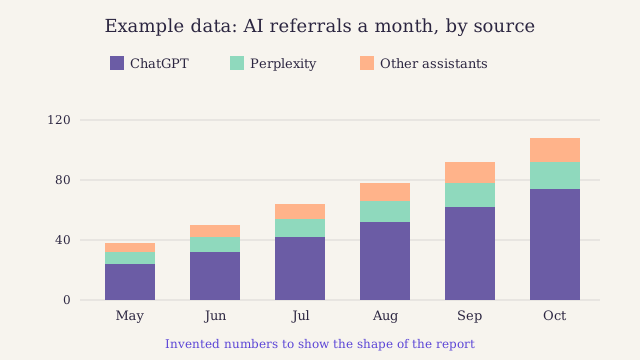
Example data for a small blog, not real figures. Notice that one source sends most of the visits, so a change in that one assistant moves the whole line.
In our own reports, the landing pages tell the clearest story. The posts that draw the most AI referral traffic are the ones with a plain answer under each question heading. If you want more of them, our guide to writing answer capsules is the place to start. To judge whether those visits pay their way, see our post on what content is worth to a business.
The limits of what you can measure #
Keep three limits in mind when you report on AI referral traffic.
- The count is a floor. Visits with no referrer are lost to direct.
- Google's AI features are mixed in. They sit inside organic search and inside web search in Search Console.
- Sources change. Domains move, apps change how they open links, and new tools arrive.
None of this makes the numbers useless. It makes them a trend to watch, not a total to report as fact.
Signing up by email is not open on this site.